Wings Systems Ltd. - Software House
All products eXPerience 8 eXPerience 6 modular DRAWings PRO XII my editor StitchPort

Free Embroidery Editor

A free embroidery viewing and editing tool for quick changes, production notes, and everyday file handling.

my editor is a free application built for users who need to open supported embroidery files, make practical changes, preview designs with more confidence, and save into different embroidery formats without stepping into a full professional package.

Free
No cost
Formats
Convert designs
Windows
Lightweight utility
my editor embroidery software

What you will achieve

Get more done with your embroidery files every day.

Use the free editor to view, lightly edit, convert, and prepare designs without opening a full professional digitizing environment.

View and convert designs

View and convert designs

Open supported embroidery files, review them quickly, and save them into different machine formats without a full digitizing suite.

Make practical edits

Make practical edits

Move, insert, replace, and delete stitches when small changes are needed for production or everyday file handling.

Preview with confidence

Preview with confidence

See realistic thread colors, fabric context, and stitch-out simulation before the design reaches the machine.
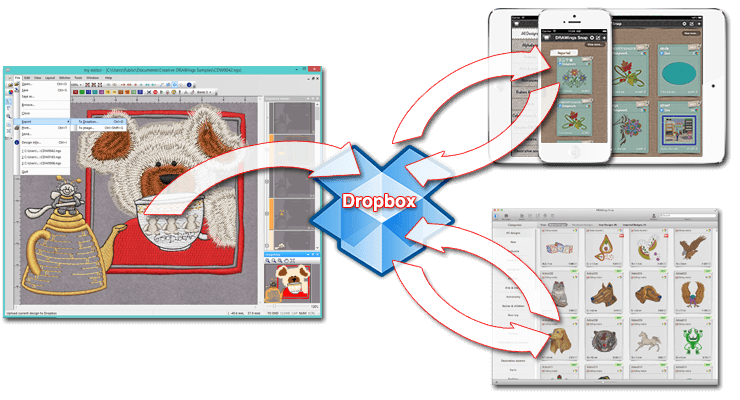
Prepare files faster

Prepare files faster

Resize, rotate, annotate, export images, create printouts, and manage design notes for clearer production handoff.

Perfect for every creator

Useful for production shops and approachable for personal users.

For professionals

  • Quick file review and conversion
  • Light edits and production notes
  • Share clearer previews with customers

For hobbyists

  • View designs without buying software
  • Make small adjustments at home
  • Export images for personal projects
my editor logo

Complete feature list

Everything my editor helps you do with embroidery files.

From file viewing and conversion to advanced stitch editing, 3D preview, and production tools — all in one free application.

File handling and conversion

  • Open and edit .NGS files
  • Open and save to many different embroidery machine file formats
  • Merge open designs by using Copy and Paste functions
  • Embroidery Design database tool with advanced search
  • Email embroidery files automatically
  • Change the design's Start and End point

Advanced stitch editing

  • Complete advanced stitch editor: move, insert, replace, and delete stitches
  • Apply special functions (thread trim, stop, sequin, applique, needle up, etc.)
  • Apply any special function in any stitch of the design, on stitch or outline objects
  • Add sequins on specific stitches and change their shape and size
  • Automatically adjust the density of stitch files when resizing
  • Remove stitches by specifying length range (remove zero length stitches automatically)
  • Select design objects by color and special function

3D preview and simulation

  • 3D preview of the embroidery design with twisted threads for visualizing the final result
  • Preview designs with different fabrics included in the software
  • Embroidery process simulation with ability to simulate the frame movement
  • View the embroidery sequence of the design
  • Export the embroidery image of the design (to .jpg, .png, .tiff, or .bmp)

Design and editing tools

  • Resize and rotate designs
  • Create beautiful designs with the Array tool
  • Apply Vertical, Horizontal, Diagonal, and Circular guidelines
  • Editing tools: Group, Ungroup, Cut, Copy, and Paste
  • Use Image map toolbar to change the view port and navigate
  • Auto Pan functionality with middle mouse click

Production and customization

  • Keep useful embroidery information and hints for each design
  • Produce detailed printout of the design
  • Fully customizable workspace: reposition toolbars and dockable rollups
  • Customize the color and thickness of all inserted outlines
  • Includes numerous Thread color palettes and ability to create custom palettes
  • Complete manual in PDF file format and online manual accessible through Help > Contents

Why my editor is the smartest choice

A free, practical alternative for everyday embroidery file handling.

Decision point my editor Others
Price Free to use Free but less features
Best for Viewing, small edits, and format conversion Often in entry-level digitizing suites
Learning curve Simple, everyday workflow Can require extensive training
System load Lightweight Windows utility Heavier with less OS compatibility
File handling Open, edit, and save multiple formats Format support may be limited
Support Contact Wings Systems for help Varies by vendor

System requirements

Plan my editor as a lightweight Windows utility for everyday embroidery file work.

Component Minimum Recommended
CPU 1.5 GHz Intel or AMD 32-bit (x86) processor 2+ GHz Intel or AMD (x86) processor
RAM 1 GB (Windows XP), 2 GB (Vista & 7), 3 GB (64-bit Vista & 7) 2 GB (Windows XP), 3 GB (Vista & 7), 4 GB (64-bit Vista & 7)
Hard disk 1 GB of free uncompressed space 1 GB of free uncompressed space
CD-ROM For installation For installation
Graphics card 3D DirectX 10 accelerator with at least 512 MB dedicated RAM, 32-bit color 3D PCI express accelerator with DirectX 9.0c compatible drivers, at least 512 MB RAM
Monitor 1024x768 32bpp 1280x1024 monitor resolution
O/S Windows XP, Vista, or Windows 7 with the latest Service Packs Windows XP (SP3 or later), Vista, or 7
Ports Available USB port for the USB Security key 1 free USB port
Printer — Windows-compatible Laser-inkjet printer

You are never alone

Support and registration are part of the experience.

Register through the official Wings XP route, follow the setup guidance, and contact the team if you need help with activation, supported formats, or choosing the right product.

View and convert

  • Open supported embroidery files
  • Save into multiple machine formats
  • Preview thread colors and fabric
  • Export embroidery images

Edit and adjust

  • Move, insert, replace, and delete stitches
  • Resize and rotate designs
  • Add production notes and annotations
  • Create printouts

Customize the workspace

  • Adjust colors and palettes
  • Configure toolbars and outlines
  • Set viewing preferences
  • Simulate stitch-out behavior

Take the next step

Download my editor for free and start handling embroidery files with confidence.

Continue to the official Wings XP registration page to access the software through the intended download flow.