Wings Systems Ltd. - Software House
All products eXPerience 8 eXPerience 6 modular DRAWings PRO XII my editor StitchPort

DRAWings PRO XII

Transform Your Creativity into Professional Results

DRAWings PRO XII turns ideas, photos, graphics, and vector artwork into finished embroidery, quilting, cutting, stencil, printing, and fabric-painting output.

Your legal guarantee rights

One-time
Purchase
230+
Training videos
Mac + Windows
Creative workflow
DRAWings PRO XII software box

What you will achieve

Go from idea to finished product faster.

Use the same guided creative environment for photo art, auto-digitizing, business expansion, and training-supported production.

Turn any photo into art

Turn any photo into art

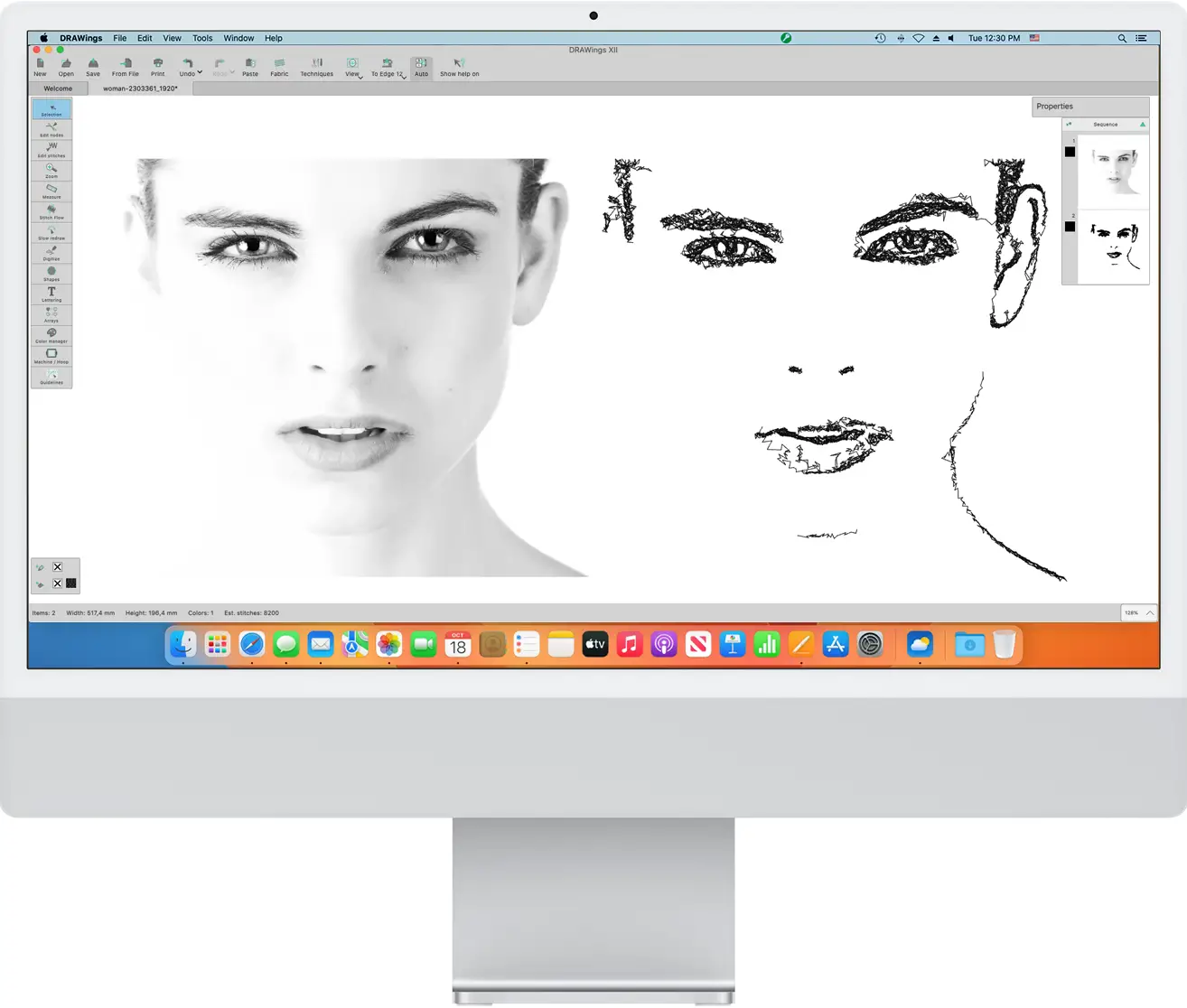
Convert favorite photos into stitch artwork using PaintStitch and Sketch-style image technologies.

Professional designs in minutes

Professional designs in minutes

Move from artwork or vector graphics to production-ready embroidery without hours of manual setup.

Expand your business

Expand your business

Offer embroidery, vinyl cutting, screen printing, quilting, stencils, and heat-transfer output from one workflow.

Master it quickly

Master it quickly

Use the official 230+ step-by-step training videos to learn the software from beginner to advanced level.

Perfect for every creator

Useful for production teams and approachable for hobby creators.

For professionals

  • Scale production speed
  • Cut digitizing costs
  • Support all machine-ready workflows

For hobbyists

  • Create personalized gifts
  • Learn at your own pace
  • Start without deep technical skills
Professional workshop and home crafting station

One software. Unlimited possibilities.

Why buy separate software when the workflow can stay connected?

DRAWings PRO XII is presented as one creative package for embroidery, digitizing, quilting, cutter output, stencils, print, and fabric decoration.

Embroidery and digitizing

Embroidery and digitizing

Create everything from corporate logos to photo-realistic stitch art, with PaintStitch, Sketch, and standard digitizing tools available in the same environment.

Computerized quilting

Computerized quilting

Build quilting blocks, stippling effects, and ambience quilting patterns that automatically echo the central design.

Cutting and stencils

Cutting and stencils

Create precision paths for vinyl decals, stencils, layered paper crafts, and cutter-assisted decoration work.

Printing, painting, and heat transfer

Printing, painting, and heat transfer

Prepare artwork for direct-to-garment printing, heat transfer, textile printing, and fabric painting.

Why DRAWings is the smartest choice

A practical all-in-one alternative to fragmented subscriptions.

Decision point DRAWings PRO XII Others / subscriptions
Payment model One-time purchase Monthly or yearly subscriptions
Version update policy Update anytime, even after skipping multiple versions Full purchase often required after skipped versions
Training 230+ free videos Often paid or limited training
Features included All-in-one creative package Tiered or scaled-down editions
Vector to embroidery Imports AI, SVG, CMX, and PDF while preserving outlines Limited support, with outlines often lost during import
Compatibility macOS and Windows positioning Often platform-limited
Support Free support with next business day response Paid or plan-based support

You'll never work alone

Training, community, knowledge base, and support are part of the story.

The official overview emphasizes 230+ free training videos, an active Facebook community, a knowledge base, and free email support with next business day response.

DRAWings PRO XII training course

Creative power

  • Convert photos to PaintStitch artwork
  • Colorful or monochrome photo-stitch
  • Gradient fill color blending
  • Automatic floral design creation
  • Crystals and rhinestones
  • Redwork conversion
  • Cross-stitch embroidery
  • Ambience quilting
  • Stencil and paint fill support

Advanced editing

  • Curved stitch directions
  • Ray-like stitch directions
  • Spiral fills in closed shapes
  • Knife splitting tools
  • Convert fill to center line
  • Form fill and vector fill
  • Circular array contour ability
  • Envelope controls for text
  • Automatic button holes
  • Advanced applique options

Professional workflow

  • Design file browser
  • Pre-digitized lettering fonts
  • Monogramming with frame templates
  • Multi-hooping support
  • Print and cut support
  • Many vector file formats
  • Dark theme for macOS
  • Color harmonies
  • Transparency-to-stitches conversion
  • Vertical text and precise spacing

Take your embroidery to the next level

Get the full guided product presentation on DRAWstitch.

Continue to the official site for the complete overview, purchase paths, trial, partner lookup, FAQ, system requirements, and all current product details.

Your legal guarantee rights