Wings Systems Ltd. - Software House
All products eXPerience 8 eXPerience 6 modular DRAWings PRO XII my editor StitchPort

Professional Embroidery Software

eXPerience 6 grows from lettering to Pro.

eXPerience 6 is the complete professional embroidery package in the Wings Systems range. It was built to be easy to use, fast in production, and able to create high-quality embroidery with the strongest possible stitch results.

Level-based suite

eXPerience 6

Start with the level that matches your current embroidery work, then move into more advanced digitizing when the business demands it.

Pilot lettering
Operator production
Puncher digitizing
Pro specialist tools
Wings' XP eXPerience 6 software box

Structure

Four levels cover Pilot, Operator, Puncher, and Pro workflows.

Best for

Embroidery businesses that need quality output, fast production, and room to grow.

Creative scope

Lettering, editing, conversion, fills, styles, sequins, chenille, and specialist output.

Overview

A professional embroidery package that can expand with your business.

The legacy eXPerience site presented the software as a complete professional embroidery package: easy to learn, fast to use, and focused on producing high-quality embroidery designs. The redesign keeps that same message but gives the content a clearer product-story structure.

The product is organized by level, so a shop can begin with lettering and everyday editing, then move into deeper digitizing, fills, styles, sequins, chenille, and other specialist tools as production becomes more demanding.

  • Produces professional embroidery quality for demanding production work
  • Supports a staged upgrade path instead of a single oversized purchase
  • Connects artwork, editing, lettering, digitizing, and specialist embroidery tools
  • Designed for companies that want speed, control, and better production output

Key features

eXPerience 6 helps you create embroidery designs with the best possible quality.

In our eXPerience 6 software, we did our best to create an easy to use and fast software which will help you create your embroidery designs with the best possible quality. eXPerience 6 is the complete professional embroidery package with the best embroidery quality in the market.

  • Blend colors, fit patterns automatically, and fill areas with stippling stitches
  • 255+ pre-digitized fonts, full OpenType support, and Dropbox export
  • Software key activation, automatic updates, and Windows 10 compatibility
01

Color blending

Embroidery color blending

Create stunning embroidery designs with blended thread colors. Apply gradient fills to overlapping stitch objects and produce beautiful color transitions that elevate your embroidery quality.

02

Pattern fitting

Intelligent way to fit patterns automatically

Split long satin stitches equally with the Fit Auto pattern option. Create an object filled with satin stitches, apply a pattern, and the software distributes it automatically based on each stitch width.

03

Stippling

Fill areas with stippling stitches

Adjust stippling stitch length, density, offset from the outline, and add styles on stippling stitches to create decorative fills for different embroidery looks.

04

Fonts

More than 255 pre-digitized fonts

Access more than 255 pre-digitized fonts available for Satin, Piping, and Zig Zag lettering. Create high-quality text art designs with professional embroiderer-grade fonts included in the software.

05

Fonts

OpenType fonts are fully supported

Beyond TrueType fonts, eXPerience 6 supports automatic conversion of all OpenType fonts to stitches. Just install the font and you are ready to convert it to embroidery stitches.

06

Connectivity

Export to Dropbox

Export designs from eXPerience directly to Dropbox and import them on any internet-connected device. Your embroidery designs are easily portable and shareable across your production workflow.

07

Updates

Automatic software updates

Wings' XP 6 periodically checks for updates and informs you when new additions are available. Stay up to date and always use the software with its latest features.

08

Licensing

Software key for more freedom

Run eXPerience 6 with a software key that gives you the freedom to work without worrying about where you placed your USB hardware key. It also leaves one more USB port available. Existing customers can keep their USB hardware key or have it replaced with a software key upon request.

09

Compatibility

Windows 10 fully compatible

Wings' XP 6 is fully compatible with the latest Microsoft Windows versions. It supports Windows XP, Vista, 7, 8.1, and 10, so your existing production environment is covered.

10

File formats

Improved file format support

Improved support for .AI format up to CC, .EPS format up to CC, and .svg files. Move your artwork into production with less cleanup and better fidelity.

Why Wings' XP

The complete professional embroidery software that fulfills every embroiderer's needs.

Wings' XP is not an ordinary software, but a profitable investment that will dramatically increase your turnover by increasing your production and the quality of your embroideries. eXPerience produces the best embroidery quality in the market.

It is robust, efficient, and flexible, covering all your embroidery needs. It is very easy to learn and use, which means you will not lose your valuable time. eXPerience comes in 4 different levels, so there is no need to spend money for options you do not want or are not going to use.

eXPerience professional embroidery software

Product overview

Professional embroidery software with the best quality in the market

Wings' XP eXPerience is a professional embroidery software package designed to deliver high-quality results with both speed and ease of use. It includes the most advanced sequin insertion functionality and communicates directly with DRAWings.

Wings' XP eXPerience 6 software package

Package

eXPerience 6 package

The complete package includes an installation DVD, training videos, installation guide, Quick Reference Card, USB security key (optional), and a PDF manual.

eXPerience 6 Pilot Operator Puncher Pro level progression

Levels

Four levels: Pilot, Operator, Puncher, Pro

eXPerience comes in 4 different levels so you only pay for the tools you need. Start from the level you wish and let your software grow along with your business.

eXPerience 6 workspace and 3D preview engine

Software

eXPerience 6 workspace

A high-end 3D rendering engine creates actual previews of embroidery designs, helping you work faster and more efficiently while editing in near-reality preview.

Levels

Finding the right level for you

eXPerience levels are designed to grow alongside your production needs, from lettering-based work to professional punching and specialist embroidery workflows.

Entry level

Pilot

The entry-level solution for lettering-based designs, providing essential tools for high-quality text creation and basic editing.

  • High-end 3D engine and simulation
  • 256+ pre-digitized fonts
  • Name Drop functionality
  • Advanced stitch editor
  • Direct machine connectivity

Mid-tier

Operator

The production level for your business, adding professional editing and punching tools to streamline your workflow.

  • Vector-to-embroidery
  • CMYK Photo-stitch
  • Convert images to cross-stitch
  • OLE-2 technology integration
Most popular

Professional

Puncher

Designed for creating original designs from scratch with advanced digitizing tools and creative control.

  • Styles with sequins
  • Advanced color blending
  • Weld, Trim and Intersect
  • 56-head continuous preview

Enterprise

Pro

The comprehensive suite for professional punching houses and embroidery experts requiring maximum technical depth.

  • Create Chenille stitch designs
  • Advanced Pattern Editor
  • 300+ pre-digitized styles
  • Clean-up Expert features

That way there is no need to spend money for options that you do not want or you are not going to use. Compare Levels

01

Pilot

Lettering workflow

Pilot focuses on fast text-art creation for daily embroidery personalization. Use any TrueType or OpenType font, place text on paths or arcs, and apply envelopes to create unique lettering designs.

  • Convert TrueType and OpenType fonts into embroidery text art
  • Place text on paths, arcs, and envelopes
  • Use Escapement to rotate letters or type words vertically
02

Pilot

File handling and editing

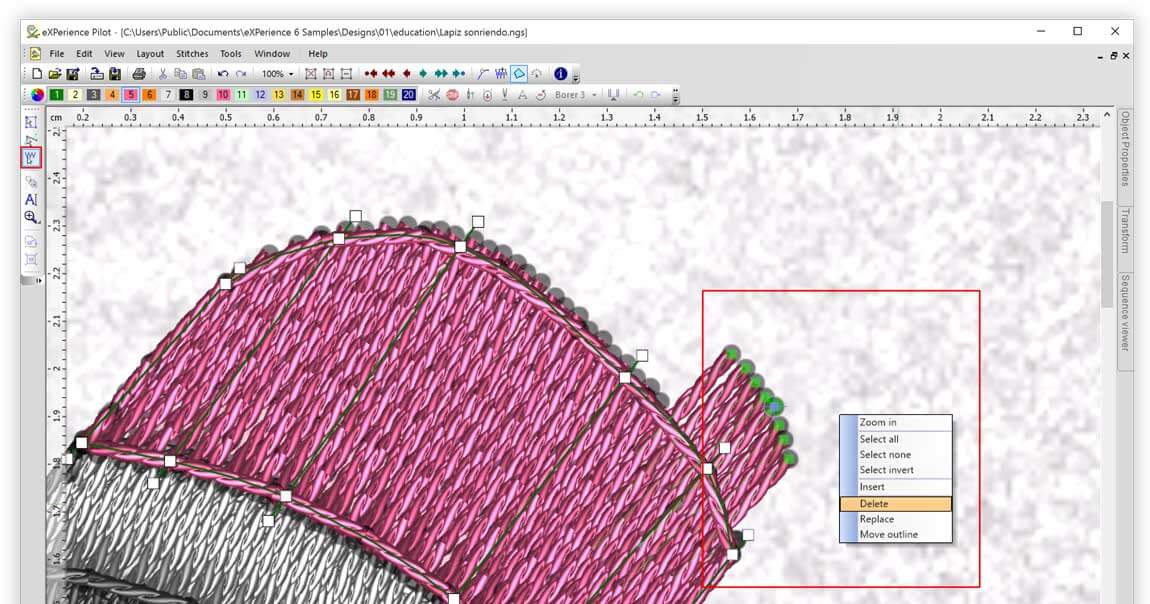
Pilot also includes the practical workspace tools you need for production work. Browse designs, insert clipart, edit stitches, and reshape objects with the node editor.

  • Browse and search embroidery files with the built-in file browser
  • Insert designs from the clipart library
  • Edit stitches and reshape objects with the node editor
03

Pilot

Object control and digitizing basics

Make the entry level feel production-ready with object transformations, the Name Drop tool, core stitch types, and slow redraw simulation.

  • Scale, rotate, slant, and mirror objects
  • Create multiple designs with different text using Name Drop
  • Use Manual, Running, Satin, Step, Zig-Zag, and Piping stitches
  • Simulate embroidery with the slow redraw tool
04

Operator

Conversion and repeat design tools

Operator adds artwork conversion, Photo-stitch, Cross-stitch, and repeat-building tools for more ambitious production work.

  • Convert vector and bitmap images into editable embroidery designs
  • Convert images to Photo-stitch with CMYK color realism
  • Convert images to Cross-stitch automatically
  • Build circular, rectangular, and kaleidoscope arrays with clones
05

Operator

Stitch-file editing

Edit existing stitch files with Operator-level tools for step patterns, joining, breaking apart, and correcting embroidery objects.

  • Edit step patterns on existing stitch files
  • Join and break apart objects for flexible editing
  • Correct and refine embroidery files for production
06

Puncher

Advanced digitizing effects

Puncher brings richer visual effects, including gradient color blending, bitmap-to-embroidery conversion, and object transformations such as weld, trim, and intersect.

  • Apply advanced color blending and gradient fills
  • Convert bitmap artwork into editable embroidery designs
  • Weld, trim, and intersect objects to create unique shapes
07

Puncher

Patterns, sequins, and styled fills

Puncher adds styling depth with patterns, sequins, auto borders, stippling, envelopes, and vector-block-form fill effects.

  • Add or change patterns on satin and filled objects
  • Create designs with sequins and auto borders
  • Fill areas with stippling stitches and style envelopes
  • Use vector fill, block fill, and form fill effects
08

Pro

Specialist embroidery workflows

Pro is the full suite for punching houses and professional digitizers, covering chenille, style conversion, font creation, sequined styles, and symbol conversion.

  • Create designs with the Chenille stitch type
  • Convert objects to styles and build custom fonts
  • Create styles with sequins and multiple frames
  • Convert symbols to embroidery designs instantly
09

Pro

Venere cutting system

The Venere workflow adds cutwork capabilities to eXPerience, converting embroidery objects into cutwork designs that your machine can trim automatically.

  • Convert any embroidery object to a Venere cutwork object
  • Create beautiful cutwork designs with automatic trimming
  • Produce perfect cutwork results quickly with Venere knives

System requirements

eXPerience 6 uses a high-end 3D rendering engine for near-reality embroidery preview.

The software includes a 3D rendering engine that creates actual previews of embroidery designs, helping you work faster and more efficiently while editing in near-reality preview.

Operating system
Windows XP, Vista, 7, 8, 8.1, or 10 with the latest Service Packs (32-bit and 64-bit).
CPU (minimum)
1.5 GHz Intel or AMD processor.
RAM (minimum)
1 GB for Windows XP, 2 GB for Windows Vista/7, 3 GB for 64-bit Vista, 7, 8, or 10.
RAM (recommended)
2 GB for Windows XP, 3 GB for Vista/7/8/8.1/10, 4 GB for 64-bit Vista, 7, 8, 8.1, or 10.
Graphics card (minimum)
3D DirectX 9 accelerator with at least 128 MB dedicated RAM, 32-bit color. Vista/7 machines must be Aero capable.
Graphics card (recommended)
3D DirectX 10 accelerator with at least 1 GB dedicated RAM, 32-bit color.
Hard disk
800 MB of free uncompressed space.
DVD-ROM (minimum)
4x speed for installation from the Box edition.
DVD-ROM (recommended)
16x speed.
Scanner
Any TWAIN compatible scanner. 300 dpi is enough for 1:1 scanning; higher optical resolution needed for enlargements.
Tablet (digitizer)
Any tablet with a WinTAB driver.
Printer
Any Windows-compatible laser or inkjet printer.
USB port
One free USB port when ordering with USB key lock.
  • What is in the box: installation DVD, training videos, installation guide, Quick Reference Card, USB security key (optional), and PDF manual.
  • Wings' XP is a profitable investment that will dramatically increase your turnover by increasing your production and the quality of your embroideries.
  • eXPerience comes in 4 levels: Pilot, Operator, Puncher, and Pro. Start from the level you wish and let your software grow along with your business.
  • Includes the most advanced sequin insertion functionality and communicates directly with DRAWings.

Next step

Need help deciding which eXPerience level fits your business today?

Describe your production workflow, lettering needs, or digitizing depth and we can help point you to the right level before you buy.